 demovie
Your agent animates.demovie makes it true.
Accurate, on-brand motion-graphics videos of your real web app: launch videos, feature clips, changelogs and teasers, made by the coding agent you already use from real captures of your running app, and checked by 30 QA rules before they render.
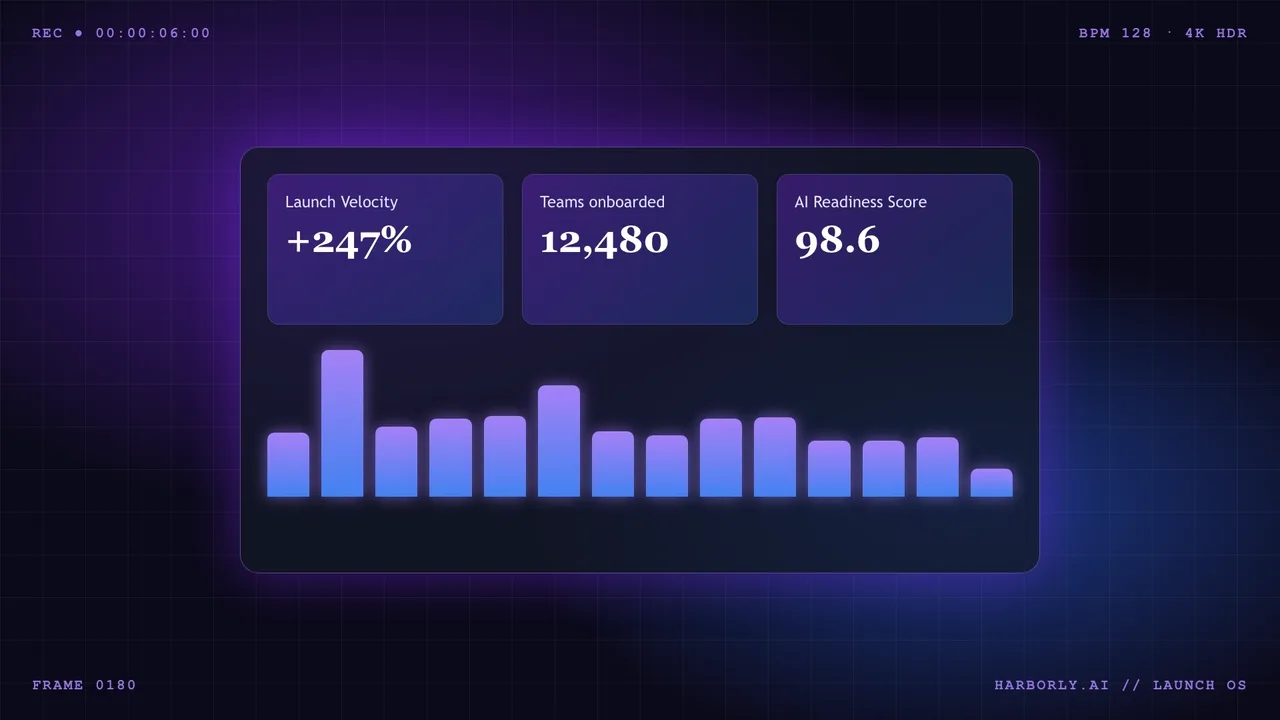
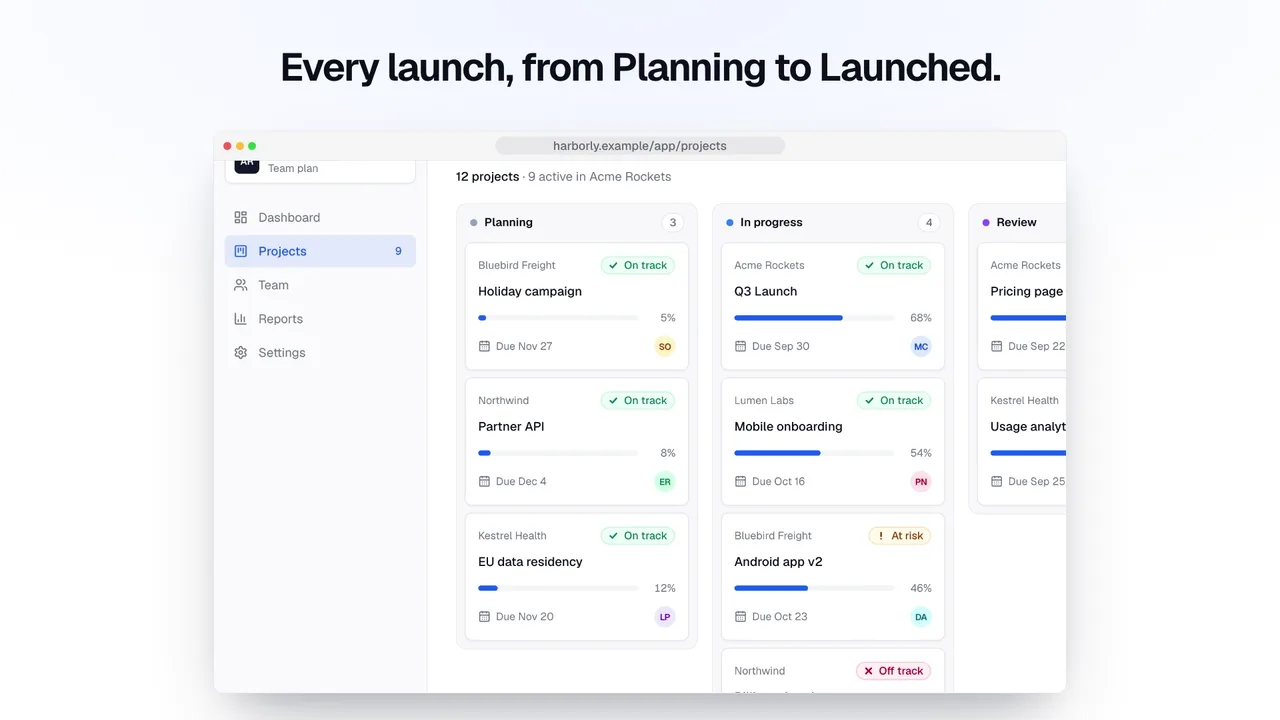
Left: a recreation of what one prompt and no captures typically gives you: an imagined dashboard, invented metrics, HUD labels. Right: demovie, from real captures of the app, in the product's own words, with a cursor that clicks real buttons. Sound is the right-hand video's soundtrack, synthesized by demovie.
Drives the agent you already use, installed and signed in by you
.demovie/ folder.How it works
Ground. Direct. Check. Render.
demovie gives your agent your real product to work from, a motion runtime to animate it, and a QA engine that checks the result. Your agent does the creative work; demovie keeps it true.
Ground
init reads your code and the running app: brand colors and fonts, your product's vocabulary, every route. capture screenshots real states with seeded demo data, a frozen clock and masked personal data, and maps every element.
Direct
Your agent follows the demovie skill: brief, capture plan, storyboard, style frames, animation. Product UI only enters through screen() with real captures; cursors, zooms and highlights target element ids.
Check
demovie qa samples the video and runs 30 rules: reading time, legibility, contrast, safe areas, pacing, truthful clicks, invented words and numbers, determinism, loudness and the “AI look” clichés, with a fix for every failure.
Render
A deterministic frame-stepping renderer (Playwright and your ffmpeg) writes H.264 MP4s in every format, posters and captions, with license-clean music and sound effects mixed to −16 LUFS.
npx demovie render launch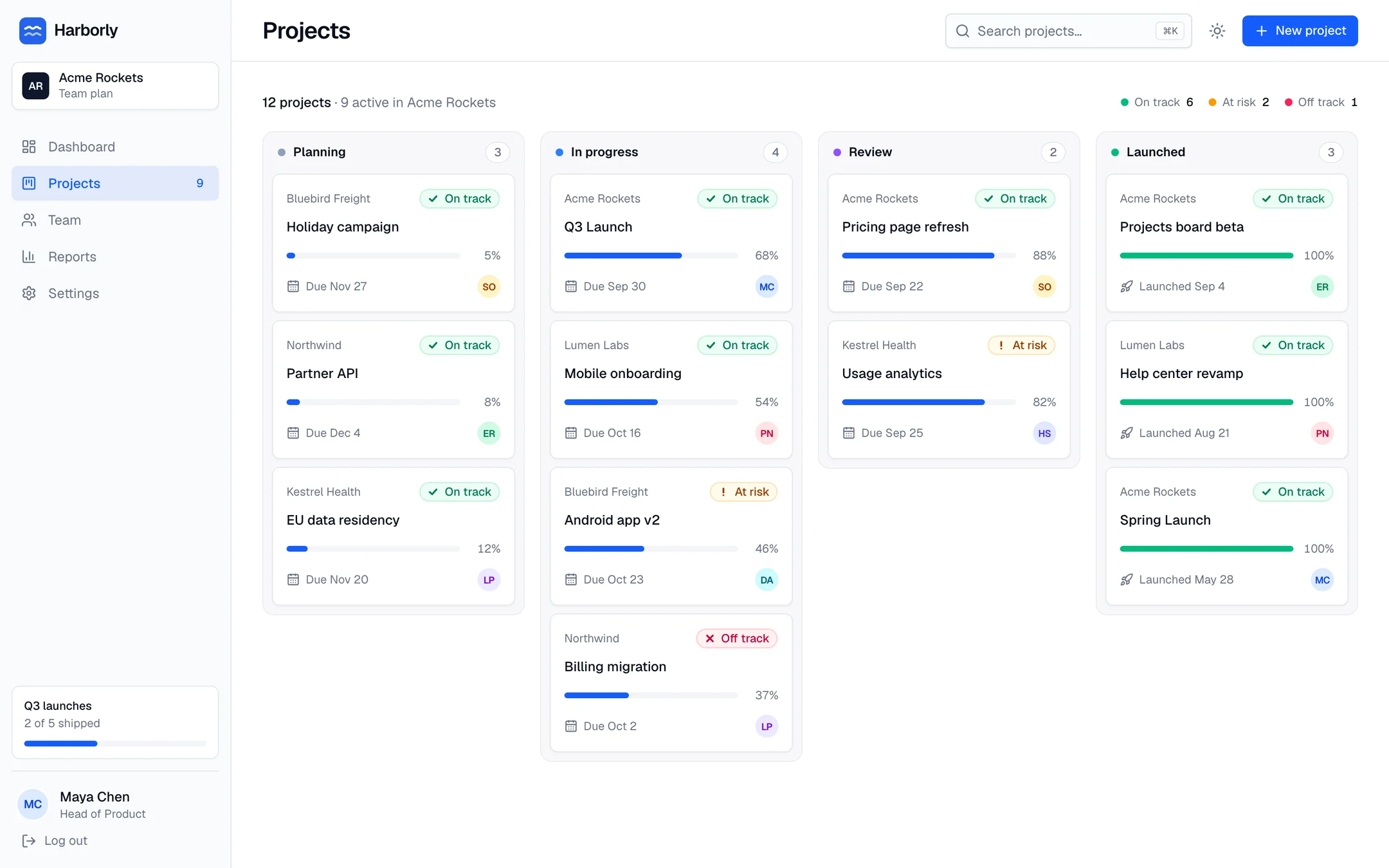
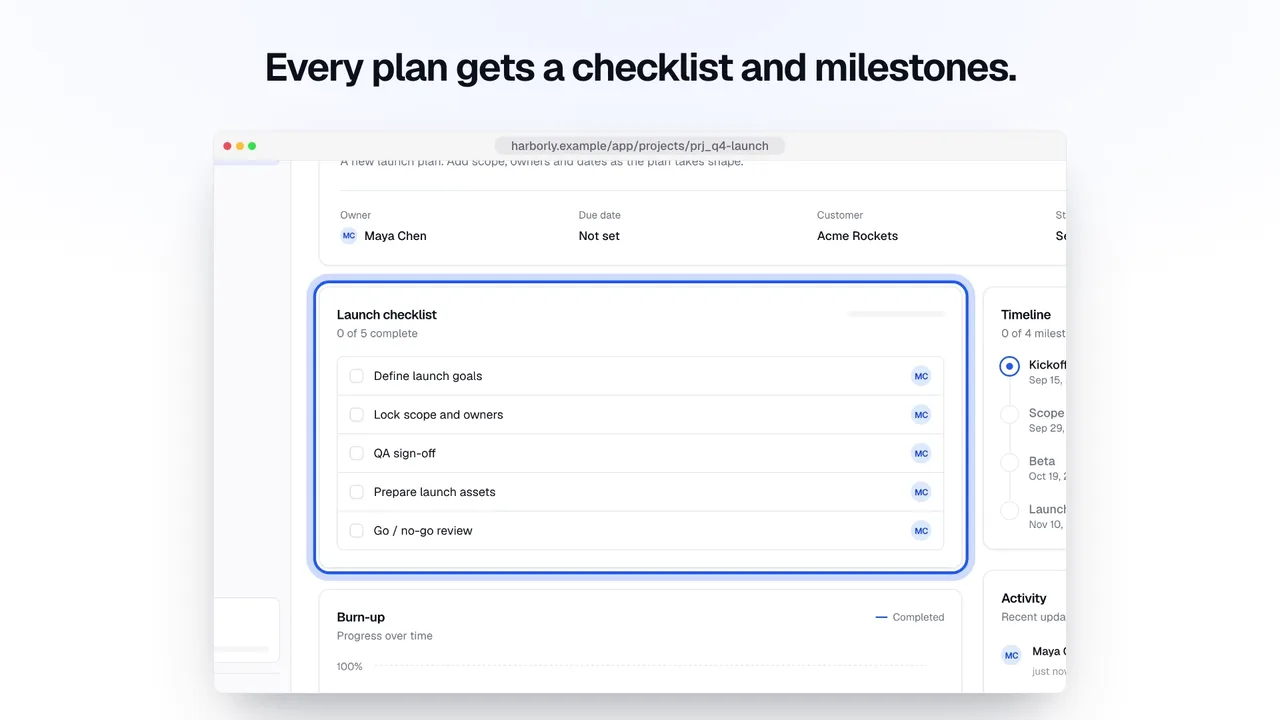
// launch/composition/main.js: the New project flow, shot 3
const plan = browser(flow, "flows/create-project@desktop/board", bar(6) - 0.3);
const pointer = cursor(v, { style: "mac" });
pointer.moveTo(plan, "link:new-project", { at: bar(6) + 0.4, duration: 0.85 });
pointer.click({ at: bar(6) + 1.35 });
plan.swap("flows/create-project@desktop/dialog", { at: bar(6) + 1.5, transition: "crossfade" });
pointer.moveTo(plan, "textbox:project-name", { at: bar(6) + 2.2, duration: 0.6 });
typeText(plan, "textbox:project-name", "Q4 Launch", { at: typedAt, cps: 14 });
pointer.moveTo(plan, "button:create-project", { at: bar(6) + 4.0, duration: 0.65 });
pointer.click({ at: bar(6) + 4.75 });
plan.highlight("generic:project-checklist", { at: bar(9) + 1.7, style: "ring" });
$ npx demovie qa launch --format all
◇ QA launch @ 16:9…
◇ QA launch @ 9:16…
16:9: 0 error(s), 0 warning(s), 0 waived
9:16: 0 error(s), 0 warning(s), 0 waived
QA passed with 0 errors (0 warning(s)) → .demovie/videos/launch/qa.json

# qa.json, 16:9
✓ DM-T01 Text stays on screen long enough to read
✓ DM-T02 Minimum text size
✓ DM-T03 No text overflow or clipping
✓ DM-T04 Contrast
✓ DM-T05 Too much text at once
✓ DM-L01 Safe area
✓ DM-L02 Overlaps
✓ DM-L03 Off-stage leftovers
✓ DM-P01 Shot pacing
✓ DM-P02 Duration
✓ DM-P03 End hold
✓ DM-P04 Shots declared
– DM-P05 Seamless loop (hero-loop only) (skipped)
✓ DM-G01 Truthful cursor
✓ DM-G02 Invented vocabulary
✓ DM-G03 Product shots use captures
✓ DM-G04 Invented numbers
✓ DM-G05 Upscaled captures
✓ DM-A01 Fonts
✓ DM-A02 Assets
✓ DM-A03 Network
✓ DM-A04 Audio provenance
✓ DM-R01 Determinism
✓ DM-R02 Blank frames
✓ DM-R03 Stray GSAP tweens
✓ DM-R04 Unregistered CSS animations
✓ DM-R05 Timers after ready
✓ DM-S01 Loudness
– DM-S02 VO overlap (skipped)
✓ DM-V01 "AI look" clichés
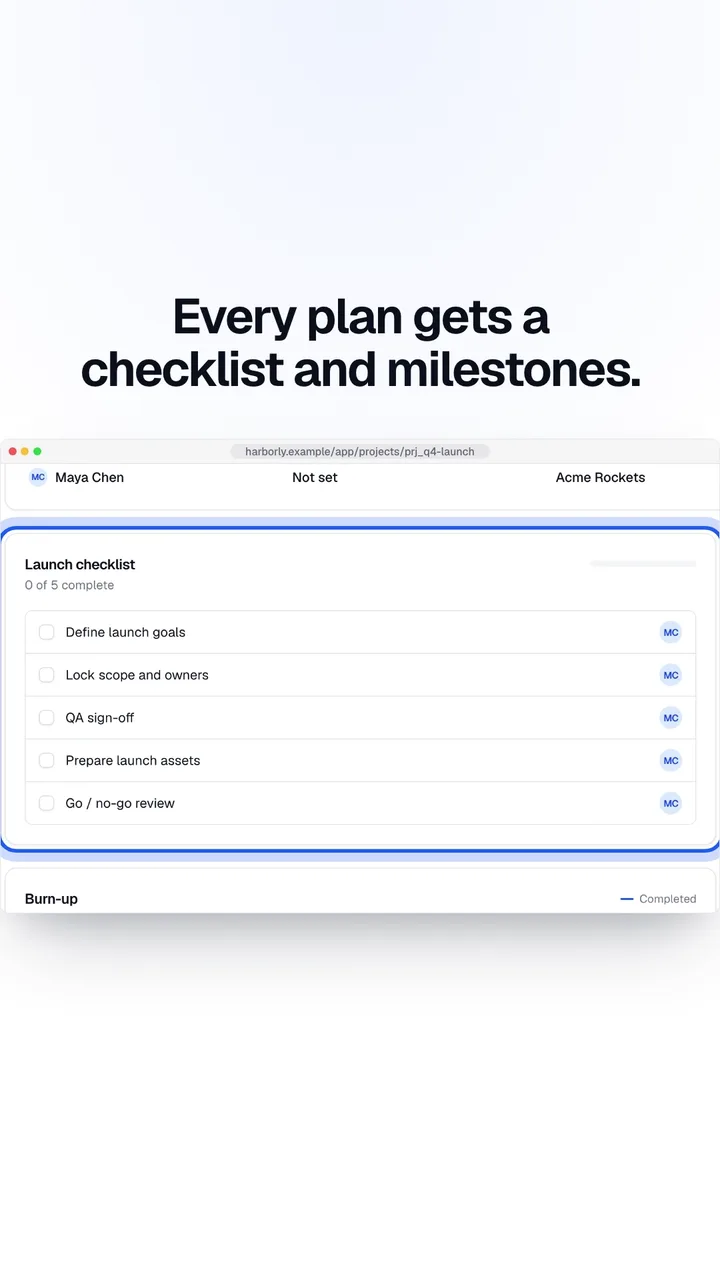
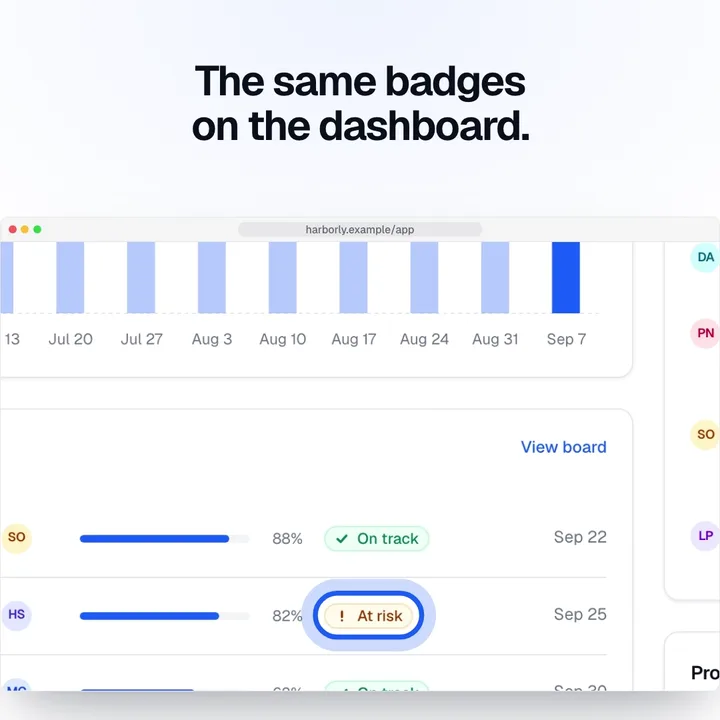
◇ 16:9: launch-16x9.mp4 (1050 frames, 67.2s, libx264)
◇ 9:16: launch-9x16.mp4 (1050 frames, 77.0s, libx264)
.demovie/videos/launch/out/launch-16x9.mp4 · 1920×1080 · 30 fps · 35.00 s · 5.9 MB · libx264 · 67.2 s
.demovie/videos/launch/out/launch-9x16.mp4 · 1080×1920 · 30 fps · 35.00 s · 4.5 MB · libx264 · 77.0 s
audio: .demovie/videos/launch/audio/mix.wav · total 144.5 s
Captures
Every element has an address.
A capture is more than a screenshot. demovie records every visible element's role, name and box under a stable id, so a cursor click lands exactly on the real button, and QA can check that it did. Hover the board, or pick an id.
56 visible elements in routes/app-projects@desktop, captured at 1440×900 and device scale 2.
Find an element
In a composition
Flows
States behind clicks, captured for real.
Dialogs, filled forms and results come from flows: a few steps of YAML that demovie replays against your running app, capturing each state on the way. The composition then animates between real screenshots instead of drawing them.
- # create-project: open the Projects board, create "Q4 Launch" through the dialog, land on the new project,
- # then return to the board where it now sits in Planning. Demo data is re-seeded before every capture run.
- name: create-project
- start: /app/projects
- viewport: desktop
- description: Create a project from the Projects board
- steps:
- - capture: board
- - click: { testId: new-project }
- - waitFor: { role: dialog }
- - capture: dialog
- - fill: { label: Project name, value: Q4 Launch }
- - capture: dialog-filled
- - click: { role: button, name: Create project }
- - waitFor: { url: /app/projects/prj_q4-launch }
- - waitFor: { text: Launch checklist }
- - capture: created
- - hover: { testId: project-checklist }
- - capture: checklist-hover
- - goto: /app/projects
- - waitFor: { text: Q4 Launch }
- - capture: board-after
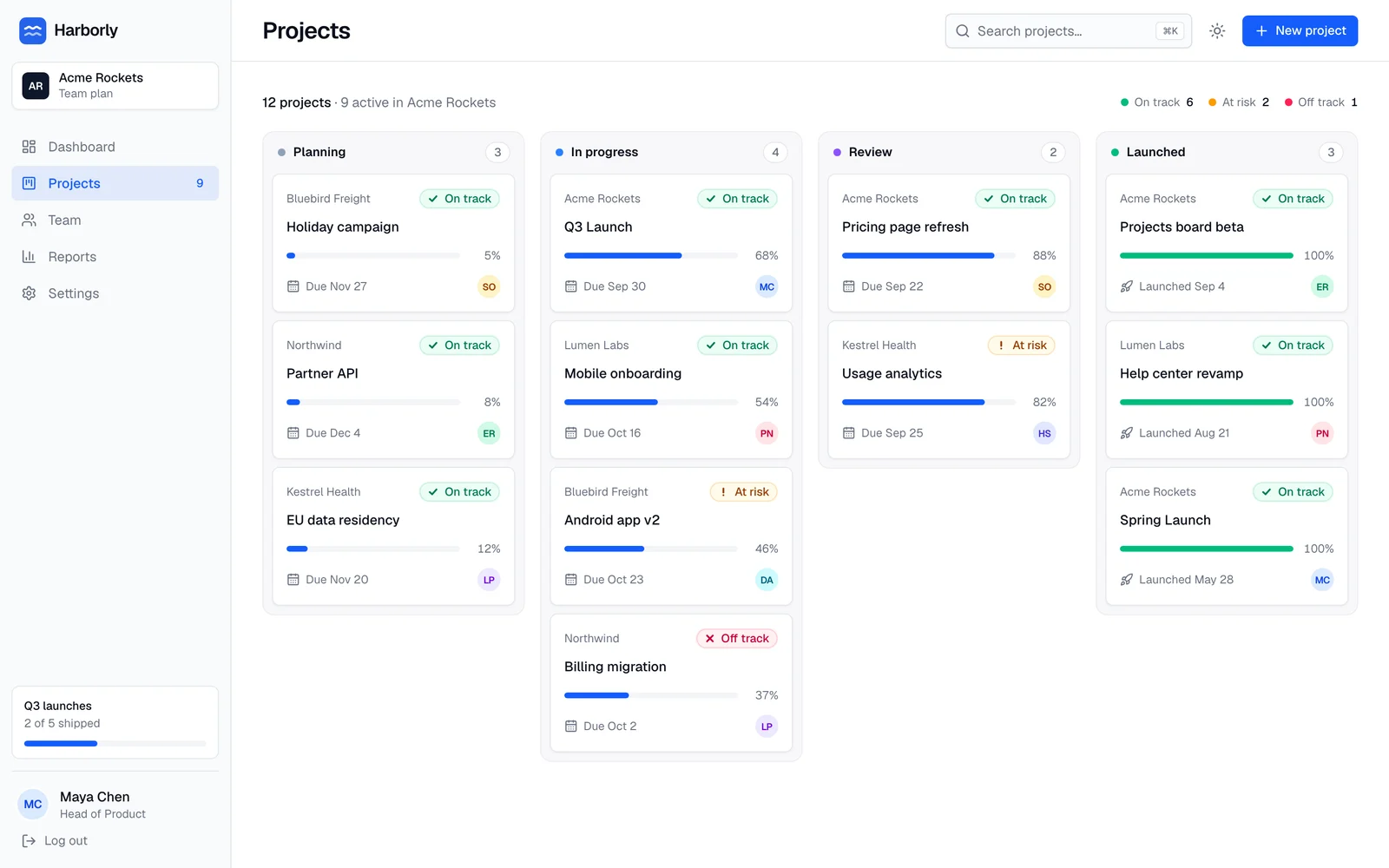
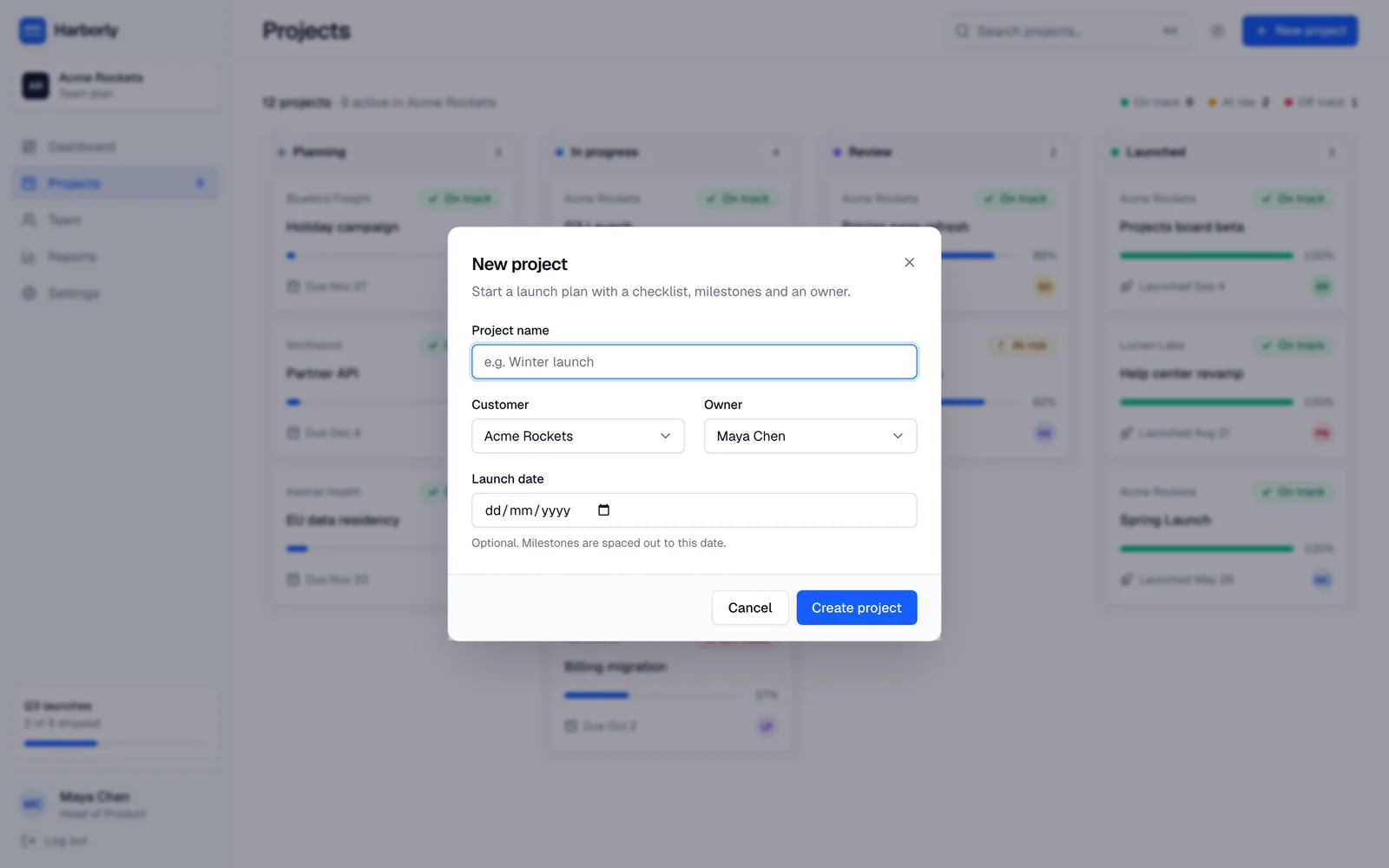
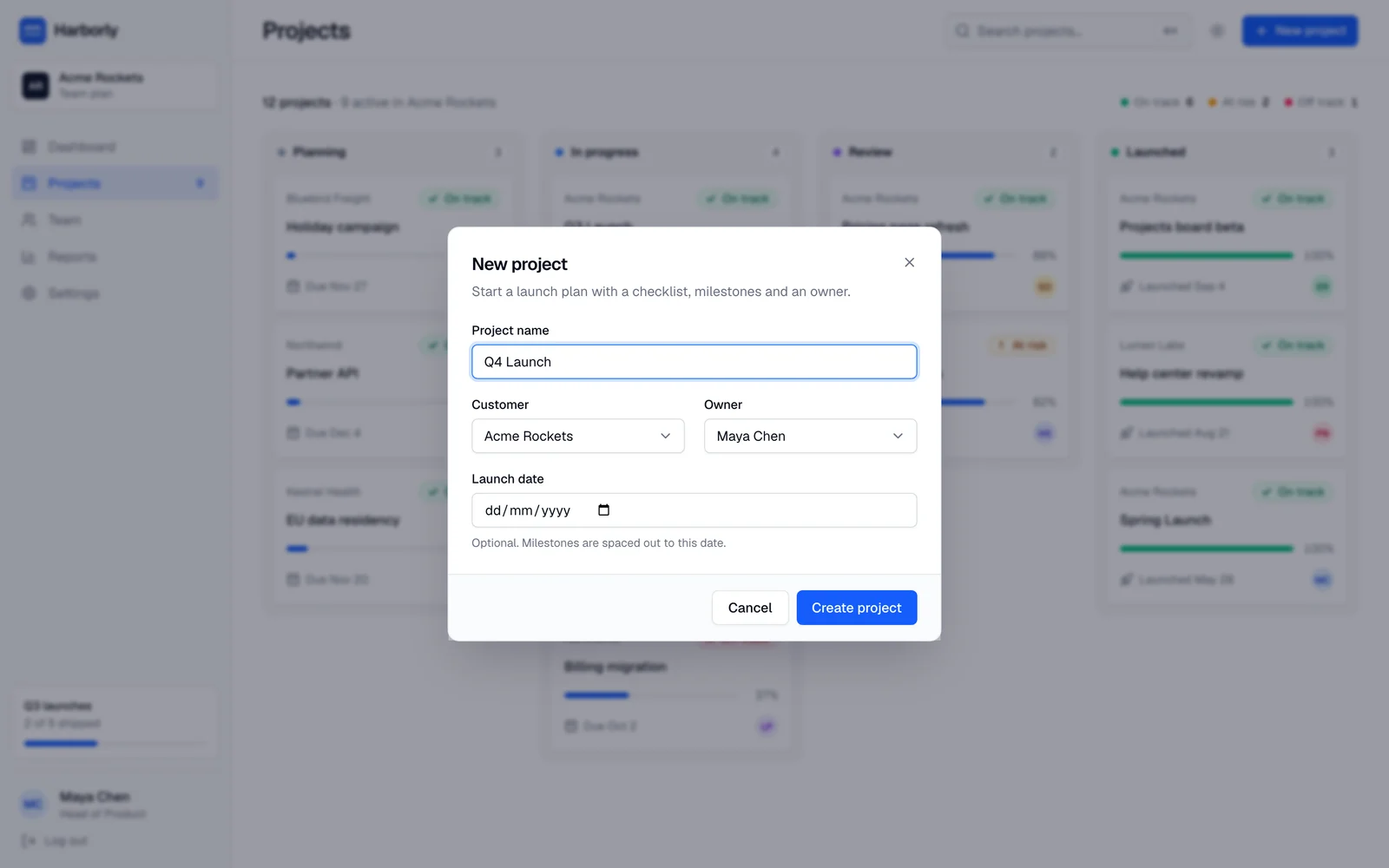
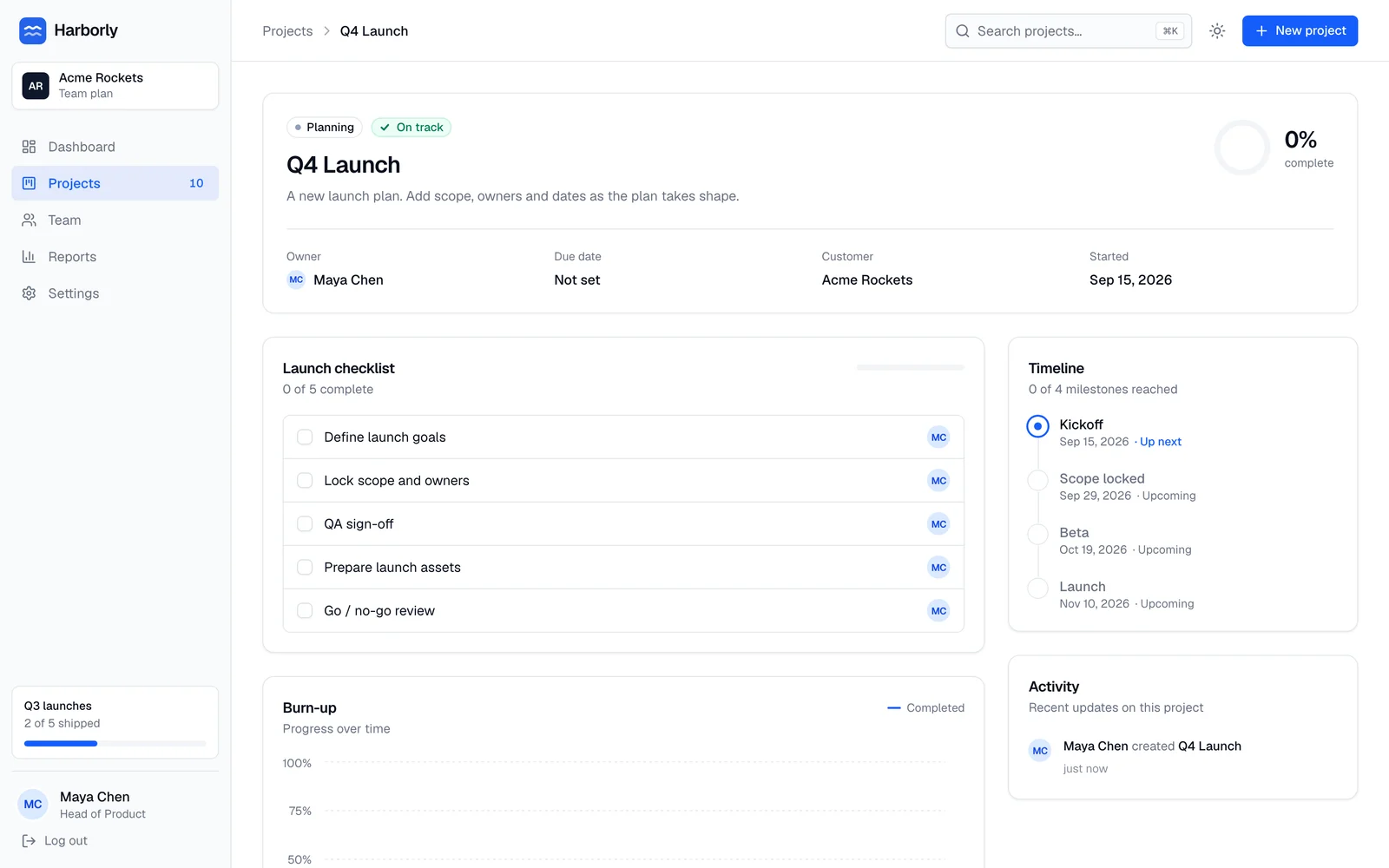
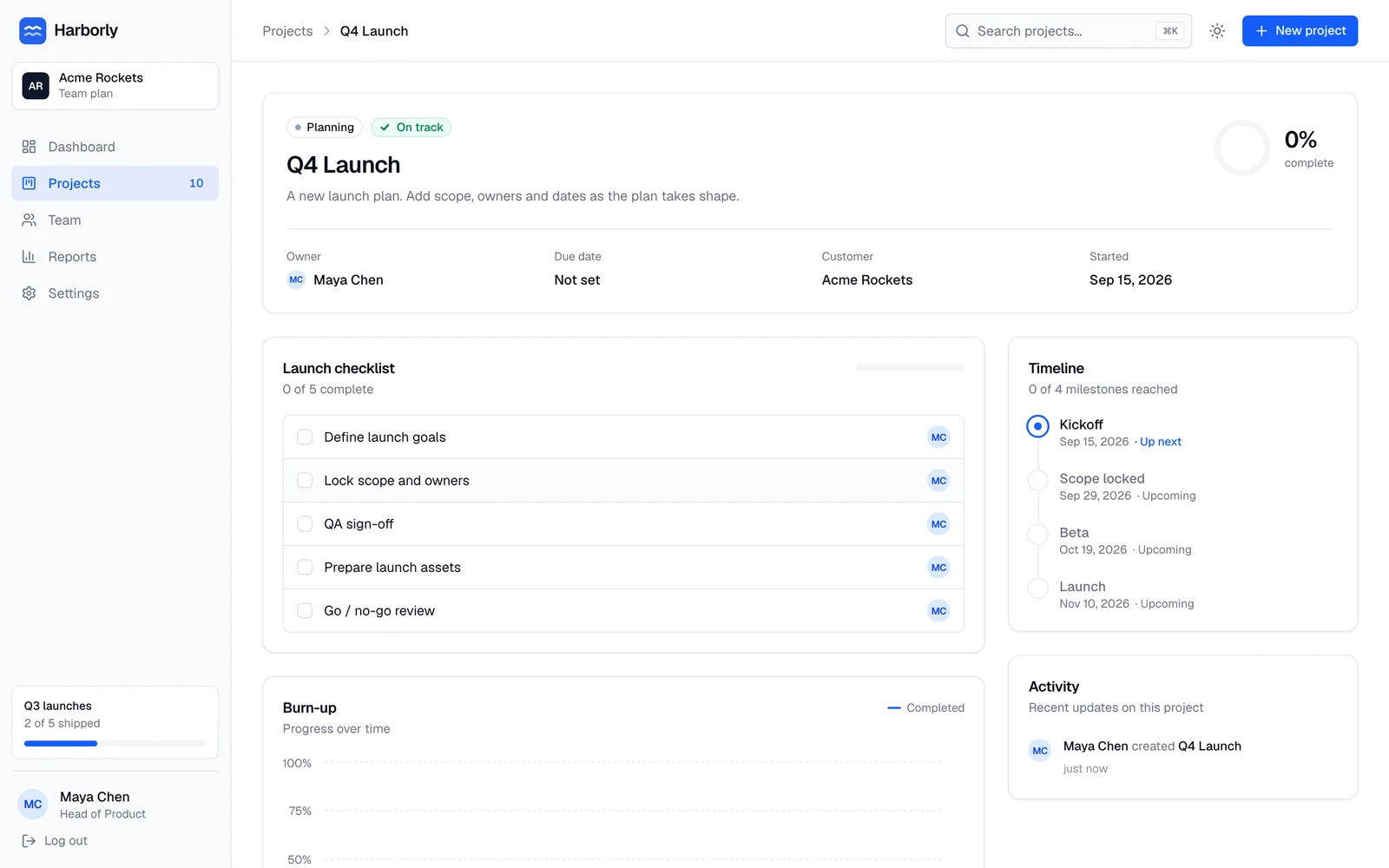
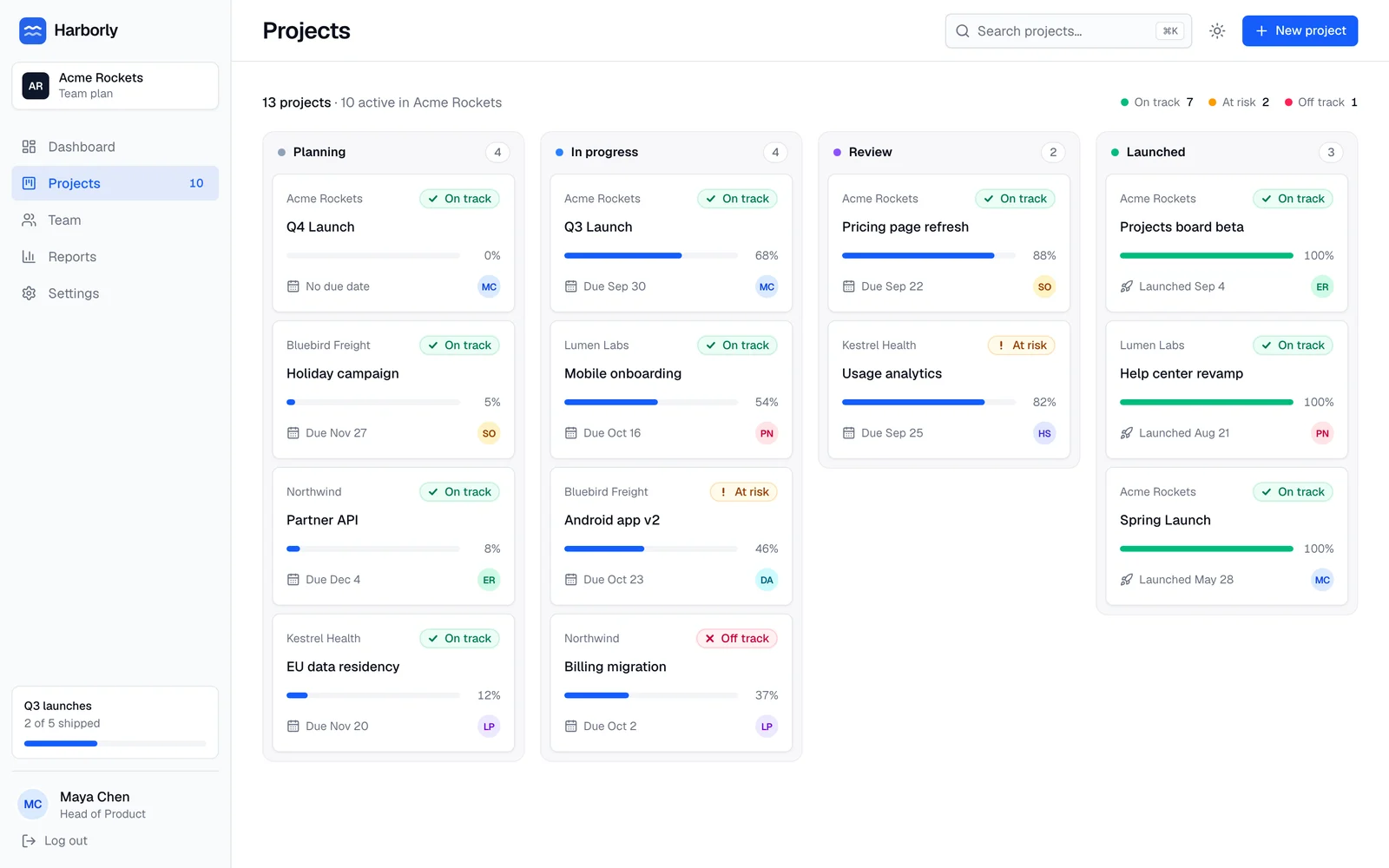
Six states of the create-project flow from the Harborly example, re-seeded before every capture run.
QA
30 checks before anything renders.
demovie qa loads the composition exactly as the renderer does, samples it at 10 fps and reports what a careful reviewer would flag, with a fix for each finding. These are real reports on the deliberately broken examples in the repo.
All 30 rules
DM-T01Text stays on screen long enough to readerror
Measures: Each distinct non-UI text block is continuously visible for ≥ 0.5 + words/3 s and ≥ 1.2 s
Fix: hold the text longer (or cut words): give it at least 0.5 s + 1/3 s per word, and never less than 1.2 s
DM-T02Minimum text sizeerror
Measures: Font size ≥ 3.0% of the frame's short side (captions ≥ 3.8%), at scale 1
Fix: set the font size to at least 3% of the frame's short side (calc(var(--dm-unit) * 3)); captions need 3.8%
DM-T03No text overflow or clippingerror
Measures: scrollWidth > clientWidth, or the text box extends beyond its container or the stage
Fix: shorten the copy, let it wrap (max-width in ch), or enlarge the container so no glyph is cut
DM-T04Contrasterror
Measures: WCAG ratio of text color vs. a sampled background ring: < 4.5 warns, < 3.0 errors
Fix: darken/lighten the text or its background (brand fg on bg), or put the text on a solid panel
DM-T05Too much text at oncewarn
Measures: More than 2 non-UI text blocks, or more than 18 words, visible at once
Fix: show one idea at a time: at most 2 text blocks and 18 words on screen together
DM-L01Safe areaerror
Measures: Non-UI text, logos and the CTA stay inside the format's safe area
Fix: move it inside the safe area: position with var(--dm-safe-top/right/bottom/left), check with preview safe guides
DM-L02Overlapserror
Measures: Two visible non-UI text boxes intersect by more than 5% of the smaller one, or text covers a highlighted product element
Fix: give each text block its own space, and keep text off the element you highlight
DM-L03Off-stage leftoverswarn
Measures: Visible elements sit fully outside the stage for more than 1 s
Fix: hide or remove elements once they leave the stage (set opacity 0 or end their shot)
DM-P01Shot pacingerror
Measures: Warn when the average shot length is below the type floor; error when more than 4 consecutive shots are under 0.8 s
Fix: merge or lengthen shots: keep the average above the type's floor and never cut more than 4 times in a row under 0.8 s
DM-P02Durationerror
Measures: Within the type's range, and equal to video.json.duration ± 1 frame
Fix: set video.json duration inside the type's range, and end the last shot exactly at the duration
DM-P03End holdwarn
Measures: The final logo/CTA shot is visible for ≥ 1.5 s
Fix: end on a logo + CTA shot held for at least 1.5 s
DM-P04Shots declarederror
Measures: At least 1 shot, and the shots cover the full duration with no gap over 0.5 s
Fix: declare shots with v.shot(id, start, end) covering the whole video
DM-P05Seamless loop (hero-loop only)error
Measures: First vs. last frame pixel diff < 2%
Fix: make the end state equal the start state (camera reset, same text and positions) so the loop is invisible
DM-G01Truthful cursorerror
Measures: Every cursor click lands inside its target element's rect under the current screen transform
Fix: move the cursor to the element (cursor.moveTo(screen, id)) so it arrives before the click, and click while the element is on screen
DM-G02Invented vocabularywarn
Measures: Capitalized terms in non-UI text that aren't in the glossary, the brief or captured UI text
Fix: use the product's own words (.demovie/glossary.md), or add the term to the brief/glossary if it is real
DM-G03Product shots use captureserror
Measures: Every kind: "product" shot contains at least one screen()
Fix: show product UI only with screen(v, { capture: "<id>", parent: shot.el }) — never draw or mock it
DM-G04Invented numberswarn
Measures: Numbers in non-UI text that aren't in the brief, the glossary or captured UI text
Fix: only show numbers from the brief, seed data or captures; put the source in the brief if it is real
DM-G05Upscaled captureserror
Measures: A screen displayed above 1.0× its native pixel density warns; above 1.5× errors (blurry)
Fix: zoom less, show the screen smaller, or capture at a higher deviceScaleFactor
DM-A01Fontserror
Measures: Declared brand and fallback fonts are loaded; no silent fallback to system fonts
Fix: check brand.json font files exist under .demovie/brand/fonts and use var(--dm-font-heading/body/mono)
DM-A02Assetserror
Measures: Any 4xx/5xx response, or a broken image or video
Fix: fix the path (composition-relative, /brand/*, /captures/*, /assets/*, /audio/*) or remove the reference
DM-A03Networkerror
Measures: Any blocked external request
Fix: serve everything locally: copy the file into the composition folder or npx demovie add it
DM-A04Audio provenanceerror
Measures: An audio file that has no provenance.json entry from a demovie generator, a configured provider, or add --licensed
Fix: generate audio with npx demovie audio music|voice|mix, or import it with npx demovie add <file> --licensed
DM-R01Determinismerror
Measures: 5 sampled frames, rendered at full size on two fresh pages in different seek orders (the second time right after the frame before each), look the same: at most 0.01% of pixels differ visibly (pixelmatch threshold 0.1)
Fix: derive everything from t: no Date/timers/real randomness, put tweens in v.timeline, make onSeek pure, and avoid will-change on animated elements
DM-R02Blank frameswarn
Measures: Frames that are over 98% one color for more than 0.3 s, outside declared transitions
Fix: start content earlier, overlap shots with a transition, or add a background element
DM-R03Stray GSAP tweenserror
Measures: Tweens outside v.timeline
Fix: add every tween to v.timeline (v.timeline.to/from/fromTo(..., at)), never gsap.to() directly
DM-R04Unregistered CSS animationswarn
Measures: Running CSS animations not registered via v.css
Fix: drive CSS keyframes with v.css(el, keyframes, { start, duration }) so they follow the timeline
DM-R05Timers after readyerror
Measures: setTimeout/setInterval called after ready()
Fix: don't use timers for animation: schedule on v.timeline or compute state in v.onSeek(t)
DM-S01Loudnesserror
Measures: Integrated loudness outside target ± 2 LU warns; true peak above −1.0 dBTP errors
Fix: re-run npx demovie audio mix <slug> (two-pass loudnorm), or lower the music/SFX gains
DM-S02VO overlapwarn
Measures: Voice lines overlap each other or run past the end of the video
Fix: move VO lines apart in voice.json/storyboard (start times) or shorten them
DM-V01"AI look" clichéswarn
Measures: Non-UI text that matches HUD, timecode, BPM or "frame N" patterns; generic status chips ("Done", "Saved", "Success") not in the glossary; more than 2 typefaces
Fix: drop decorative HUD/timecode labels and generic chips; stay with the brand's one or two typefaces
Rules listed in video.json qa.ignore are reported as waived; --strict turns warnings into errors. Full details in the QA rules reference.
Gallery
Made with demovie.
Every video here was made from captures of Harborly, a fictional app in the repo, by following the same skill your agent uses. All of them pass QA.
Formats
Every format, laid out on its own.
One composition, separate layouts. The vertical launch video keeps the board legible by framing cards instead of cropping the landscape one; the changelog clip gets its own square cut.
Quickstart
Three commands. Then just ask.
In your app's folder: set up once, capture, then ask your agent for a video in plain words, or let make start it for you. The status and log below are real: Harborly at grounding level L3, and the headless run that made its teaser.
$ npx demovie init       # detect your app; brand, glossary, routes, login, skill
$ npx demovie capture    # screenshots + element maps of every route and flow
$ npx demovie status
demovie 0.1.0 · Harborly (nextjs)
captures: 20 (0 stale, updated 2026-10-02T23:02:28.765Z)
grounding: L3 (flows captured, with multi-step states)
videos: changelog [rendered, QA 0E/0W], launch [rendered, QA 0E/0W], projects-board-teaser [rendered, QA 0E/0W]
$ npx demovie make --type teaser --format 16:9 --yes
[ 2m 15s] → Bash npx demovie stills projects-board-teaser --every 1 --format all --sheet
[ 2m 35s] → Bash npx demovie qa projects-board-teaser --format all
[ 3m 11s] Rendered. Writing the share copy.
Claude Code finished · 3m 21s · 43 turns · $1.06 (as reported by Claude Code)
videos: .demovie/videos/projects-board-teaser/out/projects-board-teaser-16x9.mp4
init --urlAgents
Works with the agent you already use.
demovie is skill-first: your agent reads the demovie skill and drives the CLI, or calls the MCP server. demovie never logs in to AI services or touches your subscription; it starts the agent you installed and signed in to, or passes through API keys in CI.
Claude Code
Install the plugin: it bundles the skill and registers the MCP server. Or let init copy the skill into .claude/skills/demovie.
/plugin marketplace add enszrlu/demovie
/plugin install demovie@demovienpx demovie make --type launch --about "the Projects board" # interactive
npx demovie make --type changelog --yes # headlessCodex CLI
init installs the skill in .agents/skills/demovie. demovie prints the MCP command but never edits your global config.
codex mcp add demovie -- npx -y demovie mcpnpx demovie make --agent codex --format 16:9,9:16Cursor
init installs the skill in .agents/skills/demovie (Cursor also reads .claude/skills) and merges the MCP server into .cursor/mcp.json.
npx demovie make --agent cursor --type teaserAny MCP client or skills-aware agent
The skill is plain Agent Skills; the MCP server speaks stdio. Or point make at any CLI.
npx skills add enszrlu/demovie
npx -y demovie mcp
npx demovie make --agent custom --agent-cmd "mytool run {prompt}"
Changelog mode
A fresh clip for every release.
demovie changes maps commits to the routes they affect through the import graph. The GitHub Action turns that into a clip on every release.
- Recaptures only what changed:
capture --changed --since <previous tag> - Runs your agent headless with the changelog preset:
make --type changelog --yes - Comments on the pull request with the poster, links and the QA summary
- Attaches the MP4s and posters to the release
- uses: actions/checkout@v7
  with:
    fetch-depth: 0                       # tags and history for `demovie changes`
- uses: enszrlu/demovie/packages/action@v0
  with:
    agent: claude                        # or codex
    type: changelog
    app-url: ${{ github.event.deployment_status.environment_url }}   # or `start: pnpm build && pnpm start`
  env:
    ANTHROPIC_API_KEY: ${{ secrets.ANTHROPIC_API_KEY }}              # an API key, not a subscription
Features
What a product video needs. None of what it shouldn't have.
Real captures, not imagination
Logged-in states via form login, saved sessions or scripts; multi-step flows in YAML or TypeScript; stable element maps; freshness tracking.
Your brand and your words
Colors, fonts and logos extracted from your code, and a glossary of your product's vocabulary that QA enforces.
A motion runtime
Device frames, camera moves, a truthful cursor, typing, callouts, captions and transitions, in five style presets.
QA you can trust
30 machine-checked rules, a preview player with QA overlays, and contact sheets for review.
License-clean audio
A deterministic music synthesizer that follows your storyboard, 12 CC0 sound effects, optional voiceover with your own key, ducking and loudness normalization.
Changelog mode
demovie changes maps commits to affected routes through the import graph; a GitHub Action makes a clip for every release.
Compare
Honest about the alternatives.
There are several good ways to make a product video with an agent now. Here is the same app made with one command each: /brag with its defaults, and npx demovie make --type teaser --format 16:9 --yes.
brag /brag
Started from the repository, nothing set up. 21.5 s, 16:9, music and sound effects. Harborly's real components and demo data, rendered in a harness it built for the run.
demovie make --yes
Started with init and capture already done (a few minutes, once per project). 12 s, 16:9, music. Screenshots of the running app with its demo data. QA: 0 errors, 0 warnings.
[1] Both runs used Claude Opus 5.5, brag at maximum effort and demovie at the default effort, so read the cost difference as a direction, not a precise ratio. brag's story is the stronger one here; demovie's run was the cheap part of a project that was already set up. Read the full comparison, including four approaches measured on a private production app.
The full comparison table
| demovie | brag | Remotion + skills | HyperFrames + skills | A prompt and a render harness | |
|---|---|---|---|---|---|
| What it is | Captures + a motion runtime + QA + renderer, driven by your agent | A Claude Code skill: reads your code, writes and renders a launch video | React framework for video | HTML framework for video, built for agents | Your agent writes a seek(t) page and renders it frame by frame |
| Where the product UI comes from | Screenshots of your running app, with element maps | Your real components rendered outside the app, or your live site | Whatever you bring | Whatever you bring | What the agent finds: often your marketing site |
| Data on screen | Your demo data | Your demo data when it can load it outside the app; otherwise sample data the agent writes | Yours | Yours | Whatever it finds |
| Pages behind a login | Built in: form, recorded session, script, several roles | Not in its docs | Up to you | Up to you | Up to you |
| Personal data on screen | Masked before each screenshot | Not in its docs | Up to you | Up to you | Up to you |
| Checks before rendering | 30 QA rules: legibility, contrast, timing, safe areas, invented words and numbers, loudness | The agent's judgment (plus HyperFrames' linter in its full mode) | Your review | hyperframes check | The agent's self-critique |
| Formats | 16:9, 9:16, 1:1, 4:5, each designed separately | One per run: landscape, vertical or square | Any you build | Any you build | Any it builds |
| A video per release | GitHub Action: what changed → recapture those pages → a clip | Not in its docs | Build it yourself | Build it yourself | Build it yourself |
| Getting started | init and capture (minutes) | One command | A project to set up | An install | A rules file and a script |
| License | MIT | MIT | Remotion's own license: free for individuals and companies of up to 3 people, paid above that | Apache-2.0 | — |
Trust
Your agent, your keys, your data.
demovie never logs in to AI services or reads tokens. It starts the agent you installed and signed in to.
Captures, videos and caches stay in .demovie/. The only outside calls are the ones you configure.
No per-company video license. Compositions are plain HTML and GSAP on demovie's own renderer.
Music is synthesized, effects are CC0, voiceover uses your own key. Every audio file has a provenance entry.
FAQ
Questions, answered.
Something else? Troubleshooting covers the common errors, and issues are open.
Why not just prompt a frontier model for a product video?
A one-prompt video looks impressive and is wrong: the model has never seen your product, so it redraws a generic dashboard, invents features, metrics and customers, and wraps it in HUD labels and purple gradients. demovie gives the model your real app — screenshots, element maps, your brand and vocabulary — and then checks the result (QA) so it stays true. See the side-by-side at the top of this page.
Why not Remotion?
Remotion is free only for individuals, non-profits and companies of up to three people; larger companies need a paid license. demovie is MIT, so anyone can use it. Compositions are plain HTML + GSAP, rendered frame by frame with Playwright and your system ffmpeg. See licensing and terms.
Does it use my Claude (or ChatGPT, or Cursor) subscription?
demovie itself never logs in to any AI service and never reads tokens. Your agent — which you installed and signed in
to — uses demovie as a tool. demovie make just starts that agent for you. In CI the action passes through API keys.
Where does my data go?
Nowhere. Captures, videos and caches stay in your repository's .demovie/ folder (captures, caches and outputs are
gitignored). There is no telemetry. The only network calls are to your own app, and — only if you configure them and
approve the cost — to ElevenLabs or OpenAI for voiceover or music, and whatever your agent does on its own.
Which frameworks are supported?
Next.js (App and Pages Router) is detected automatically, including route groups, dynamic routes, middleware/proxy
protection and monorepos. Any other web app works in generic mode: npx demovie init --url http://localhost:5173.
Can I edit the video by hand?
Yes. composition/main.js is ordinary JavaScript with GSAP; npx demovie preview <slug> hot-reloads as you edit.
How is this different from brag, Remotion or HyperFrames?
brag turns a project into a quick launch post with one command; Remotion and HyperFrames are frameworks for building videos as code. demovie is for videos that must show your real, current product, logins and data included, checked before they render and remade on every release. See how demovie compares, with measurements from one real app made four ways.
Make your first video.
A few minutes of your time, then your agent works on it. The MP4s land in .demovie/videos/<slug>/out/.
demovie is free and MIT licensed. If it saves you time, buy me a coffee.